


WordPress forms are the easiest way to get in touch with your website visitors. At this time, there are so many WordPress form builder plugins are available and we always recommend the best one – WPForms. With the awesome features, integration opportunities, WPForms is still one of the #1 WordPress form builder for WordPress.
However, in this post, we are going to show you how to reduce form abandonment in WordPress using WPForms. Here’s everything you need to know.
Table of Contents
What Is WPForms
WPForms is a freemium WordPress form builder plugin which is used by millions of users around the globe. The free version of WPForms called WPForms Lite and you can get it from the WordPress repository. For creating a simple contact form, newsletter forms, and suggestion forms, the free version is good enough.
Sadly, you won’t be able to get any integration opportunities with the payment gateways, email marketing services, etc in the free version. When you represent a business, you might want to consider purchasing the premium version.
With WPForms, you will be able to create
- Contact Forms.
- Newsletter Sign Up Forms.
- Payment Forms.
- User Registration Forms.
- Product Order Forms.
etc…
NOTE: The Form Abandonment add-on is not available in the free version. You need a premium license for using it.
Why Reduce Form Abandonment?
Actually why we need to reduce the form abandonment?
I’ve already said that the forms are an easier way to get in touch with your customers. For example, let’s say that you are running a WordPress support business where you will fix errors and issues for your clients.
So, probably you are getting targeted visitors on your website. Every person looking at your website might we looking for someone to fix their WordPress blog.
The 3 methods for getting in touch are
- Live Chat.
- Contact Forms.
- Phone.
In a survey, we found that folks will choose the contact form and the live chat feature than phone support. So, when someone fills out the form but haven’t completed it, you lost a lead.
He may be in a hurry and couldn’t complete it. Normally contact forms will not show you lost leads. Well, here, with WPForms, you can easily reduce the cart abandonment.
Here’s how you can reduce it if you are using the WPForms.
How to Reduce Form Abandonment in WordPress
First of all, install the premium version of WPForms in your blog. Once you got installed it, activate it and verify your license key. This is how you can start receiving updates and support from the team.
Go to the add-ons section and activate the form abandonment add-on.
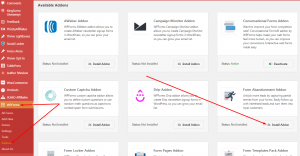
Now go to an existing form or create a new form. In our case, we are about to create a new quote form.
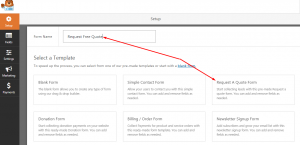
The form builder will be opened with a pre-made quote form. You can always add/ remove fields in the form. Once you are done configuring, save the form.
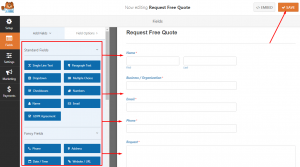
Now here comes the magic. Go to the form settings and you can see the form abandonment option there. Simply enable it.
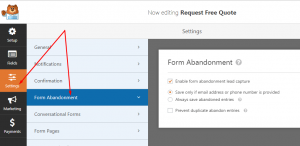
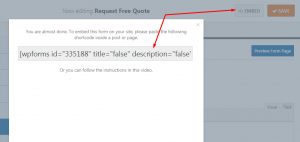
That’s it! You can also make your forms even more powerful using conditional logic, integrating with an email marketing provider, form pages add-on, etc… Well in our case, this is good enough. Save the form. Now, it is time to embed our form.
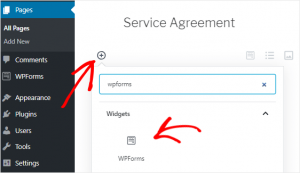
WPForms is also optimized for the WordPress new block editor. If you are using Gutenberg editor in your blog, you can easily use the WPForms block for adding the form.
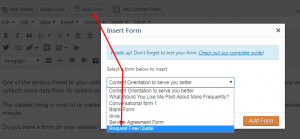
In most cases, you might be using the old-classic editor. In that case, you can embed the form using the shortcode or right from WordPress editor.
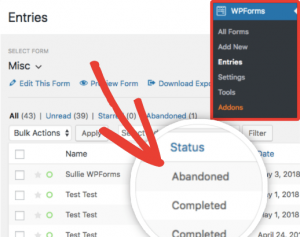
For checking the form performance, go to the entries section in the WPForms plugin settings. There, you can see each form performances including the status.
That’s it!
Now, you can see the abandoned leads too. By contacting them personally, you can easily follow-up, increase your revenue, improve brand performance.
WPForms is awesome for every personal blog and business blogs. Check out the new product WP Mail SMTP by WP Forms.
Get WPForms Now
You can get the premium version of WPForms to click the link.
We hope you found this post helpful and enjoyed the read. If you did, please consider sharing this post with your friends and fellow bloggers on social media networks.