


Want to create a Signature form on your WordPress website? In this tutorial ill suggest an easy way to create a Signature form in simple ways.
Table of Contents
What is Signature form and why we use it
A signature form is a normal form it contains a digital signature of your clients and you. It’s a kind of protection for business agreement between you and your clients. It’s easy to sign your clients in contract using a mouse or touch screen,
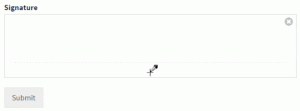
Using the digital signature don’t waste time sending contracts to their mail. Using Signature form digitally it’s faster than paperwork in a short period of time.
In this case, I recommend WPforms you can create the signature form in an easy way. And put it on your website without print or fax, use it as a normal form.
Service Agreement
Creating a service agreement is a good decision for your business growth and you can avoid legal issues.
- Mention the terms and conditions and payments.
- Ask for client details including address and phone number.
- Get the signature of your client.
If you are not getting an idea for service agreement you can view this sample agreement for small business this may not be your business agreement but it gives an idea to you what is service agreement.
Service agreement form protects you and your clients with legally binging court recognized contract. Its automatically generated when your form is submitted.
let’s starts how to create a signature form in WordPress with WPforms in 3 easy steps.
Step 1: Create Your Signature Form
First, we need creat your signature form for service agreement page. First thing you need to install WPforms plugin and activate it.
For video tutorial how to install WPforms and create a contact form in WordPress.
Once WPforms installed you need to install and activate Signature Addon then only users able to submit digital signature in agreement.
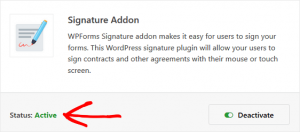
After activating signature addon on your WordPress site, the signature field option will automatically be added to all forms. To use this feature need to create a form.
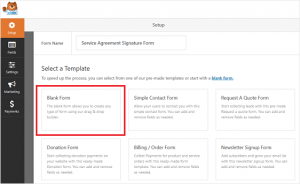
Then click fields you’ll see the signature field under the fancy field section.
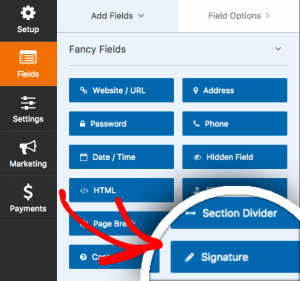
Just drag and drop of this field in to preview of your form.
Set to click required so that users cant your form until they sign on it.
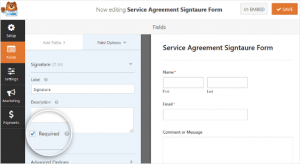
Once done click the save button.
Step 2: Configure Your Form’s Settings
You must configure you form settings before adding your form to your service agreement.
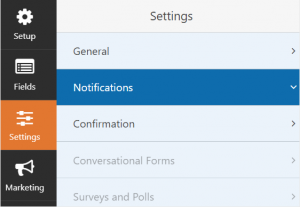
There are many settings you can configure on a WordPress form:
General Settings – In this settings you can change form name, description, etc. you can enable spam feature to secure your website and avoid spam submissions.
Form Confirmation Settings – Form confirmation is a message it appears when users submit service agreement form on your website.
Form Notification Settings – Once you service agreement form submitted you get a notification email. you can set automatic mail to your users or client receive mail about a form submission.
Once you created a service agreement form you need to connect with your email marketing provider.
WPForms offers the following email service provider integrations:
- MailChimp
- AWeber
- Drip
- Campaign Monitor
- GetResponse
- Constant Contract
Remember to click save button for your every change in form’s settings
Step 3: Create and Publish Your Service Agreement
Now, let’s add a service agreement form on your WordPress page.
Go to Pages -> Add New to create a new page, Once you created a page put Service Agreement name on it.
Then add a service agreement form on a WordPress page click on the Add Block (+) icon and search WPforms and click on it.
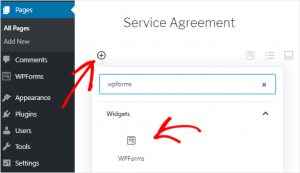
Now, select your service agreement form from the dropdown box to add it to your service agreement page.

Then click the publish button, now your service agreement form ready.
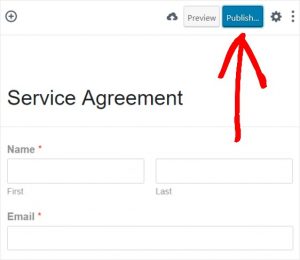
You are done! now you ready to create a service agreement with a digital signature.
WPForms is a perfect one for WordPress Builder to create a form and easy to use.
It’s perfect for bloggers, Designers, Developer. If you want to create a custom WordPress form, then you need to use WPForms.
Get started WPforms today and get a special offer.
If you like this post don’t forget to share with your friends and follow on Facebook and Twitter.